XYNTH-1

MODEL XY-1 · APPLE SILICON · MACOS 14+

Play the glass.
Zero speakers.

XYNTH-1 drives your MacBook’s Force Touch motor directly up to 4 kHz — turning the trackpad into a tactile 5-finger synthesizer you hear and feel straight under your fingertips.

Interactive browser preview: web pages can’t drive macOS Force Touch haptics directly, so this preview synthesizes through Web Audio. Download the native Apple Silicon app to play your trackpad glass with speakers muted.

INSIDE THE INSTRUMENT

Engineered like hardware.
Built directly for Apple Silicon.

01 / FIVE-FINGER POLYPHONY

Hear & feel five fingers on glass.

Every fingertip gets a guaranteed fundamental pitch inside the Force Touch actuator’s six-partial engine, backed by a 32 ms anti-flicker grace window so chords hold steady without cutting out.

The recessed OLED tracks live note accuracy, an FM-style harmonic operator schematic, real-time composite oscilloscope, and the motor’s tactile FEEL and acoustic SWEET frequency bands.
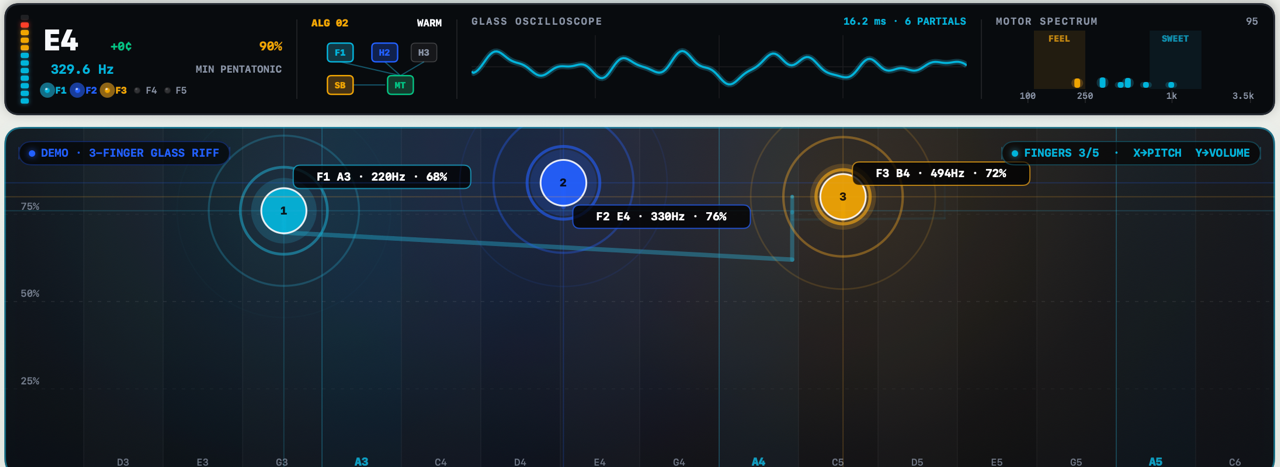
XYNTH-1 live OLED telemetry bar and 3-finger chord ripples playing A3, E4, and B4 on the glass fingerboard
Live OLED telemetry, F1–F5 polyphony bank & 1:1 trackpad mirror during a 3-finger Am9 chord.
02 / TACTILE CONTROL DECK

Precision encoders, custom dials, zero stock clutter.

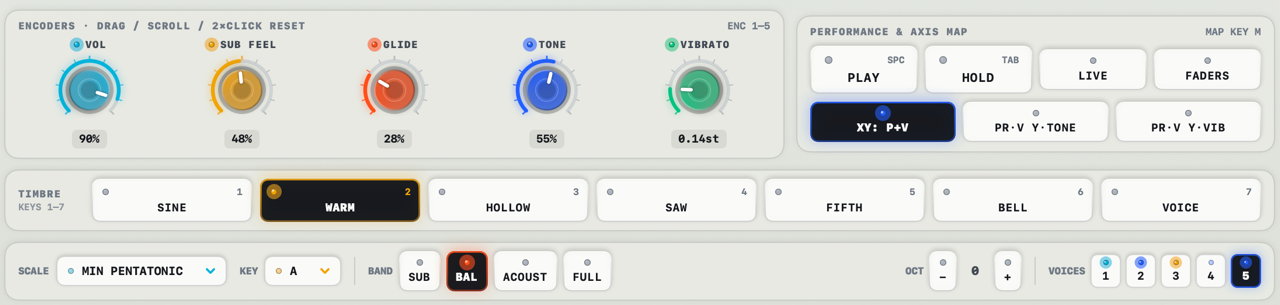
Shape volume, fingertip sub-feel (110–245 Hz), portamento glide, overtone brightness, and vibrato LFO using five color-coded rotary encoders — drag, scroll-wheel, or double-click to reset.

Switch between seven additive timbres (keys 1–7), nine quantized scales or fretless Theremin mode, four frequency bands, and polite hover callouts that vanish the instant you click.

XYNTH-1 hardware control deck showing five color-coded rotary encoders, performance LED keycaps, seven timbres, custom scale dropdowns, and 5-voice bank
Color-coded encoders, illuminated LED keycaps, custom themed dropdowns & 1–5 voice selector.
03 / EIGHT HARDWARE COLORWAYS

From Dieter White to Neon Cyber in one keystroke.

Press C anytime — even while Play Mode is locked — to transform the entire aluminum chassis, OLED phosphor, LED optics, and encoder caps across eight distinct industrial designs.

XYNTH-1
OP-1 FIELD
A4 440.0 Hz · 5V
04 / FERRO-1 MAGNETIC BAY & AUDIO OUT

Snap out a liquid magnetic chamber — and mirror audio for recording.

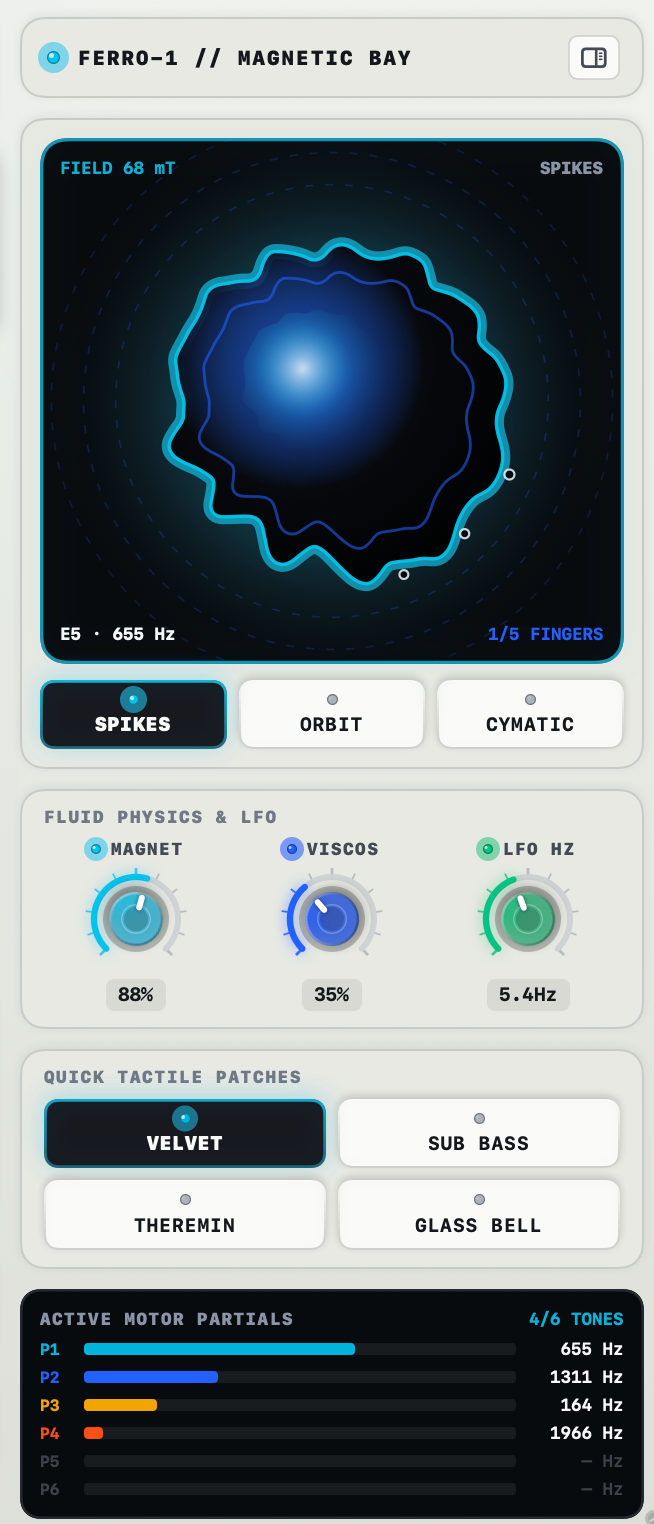
Toggle FERRO (V) to expand a right-hand modular rack running a 60 fps spring-damped ferrofluid solver sculpted directly by your trackpad’s active sine partials in Spikes, Orbit, or Cymatic mode.

Need to capture a screen recording? Flip on Audio Out (A) to route a phase-continuous CoreAudio mirror straight to speakers, headphones, or BlackHole while the glass keeps resonating.

MODES
SPIKES · ORBIT · CYMATIC
PATCHES
VELVET · SUB BASS · THEREMIN · BELL
AUDIO MIRROR
COREAUDIO · BLACKHOLE / OBS
XYNTH-1 right-side FERRO-1 liquid magnetic expansion bay with spiking ferrofluid, MAGNET/VISCOS/LFO knobs, quick tactile patches, and live P1–P6 motor partial bars
Expandable FERRO-1 magnetic bay with live P1–P6 actuator partial telemetry.
05 / REAR SERVICE PANEL & AUTO-UPDATES

Flip the chassis over for gestures, updates & motor safety.

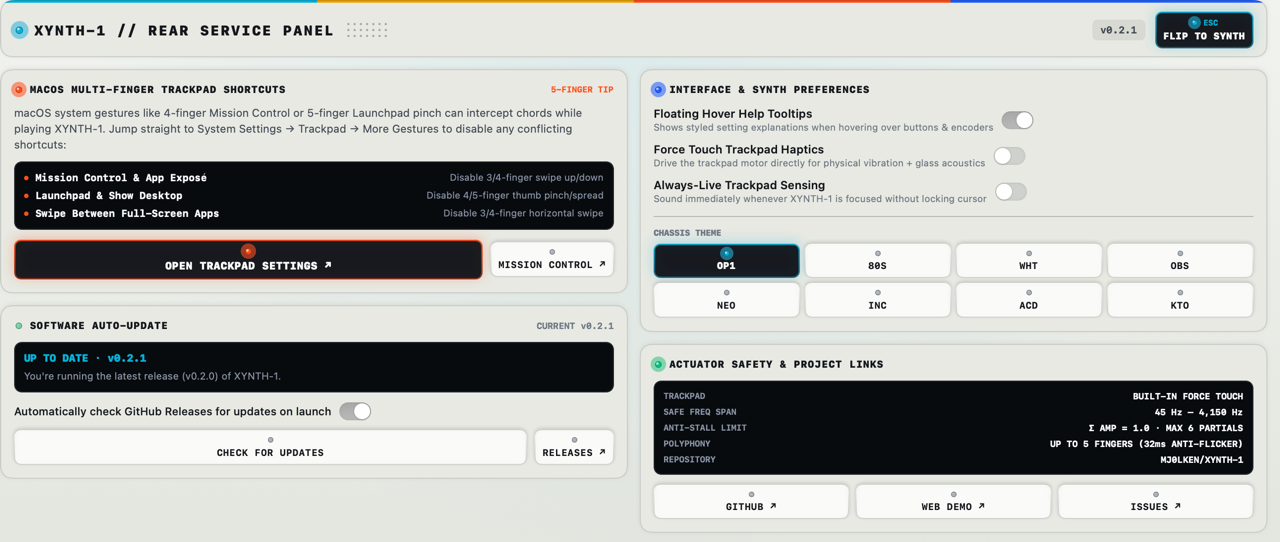
Click the top-right gear (⌘,) to 3D-flip XYNTH-1 onto its machined rear service plate. Jump straight to macOS System Settings → Trackpad → More Gestures in one click to disable conflicting 4- and 5-finger swipes.

Includes zero-dependency GitHub Releases auto-updates and hardware-enforced safety invariants: amplitudes normalized to Σ = 1.0, frequencies clamped within 45–4,150 Hz, and max 6 simultaneous partials.

XYNTH-1 Rear Service Panel featuring one-click macOS Multi-Finger Trackpad Settings shortcut, GitHub Releases auto-updater, theme selector, and actuator safety specs
3D-flipped Rear Service Panel with 1-click macOS Trackpad Settings deep-link & auto-updater.